Analysis › Process · version 2 · has a preview
Move a file's localizations (or one channel of them), or resample an image into a new one, <name>_T: typed shift, rotation, scale and mirror, a named transformation, a move a loaded file records (a two-channel fit's overlay), a transformation file, or the drift of another file recorded at the same time.
Moves one file's localizations – or one channel of them – or an image layer, so that it lies where it should. Some typical cases:
What moves is the target. For localizations the coordinates themselves change: x_nm, y_nm and, if the table has it, z_nm. The change is logged and can be undone, and everything after it – measurements, exports, ROIs – sees the moved coordinates, as the picture does. An image layer is recalculated into a new image, <name>_T as SMAP called it; the original stays as it was, and the layers that showed it show the new one. Of an image, by default only the secondary channel moves, onto the main one – the half of the chip a channel map is about.
What it is moved by is the source: values typed in (shift, rotation, scale, mirror), a named transformation the session keeps, a move recorded in a loaded file (the overlay of a two-channel fit), a transformation file (such as a bead calibration), or the drift of another file.
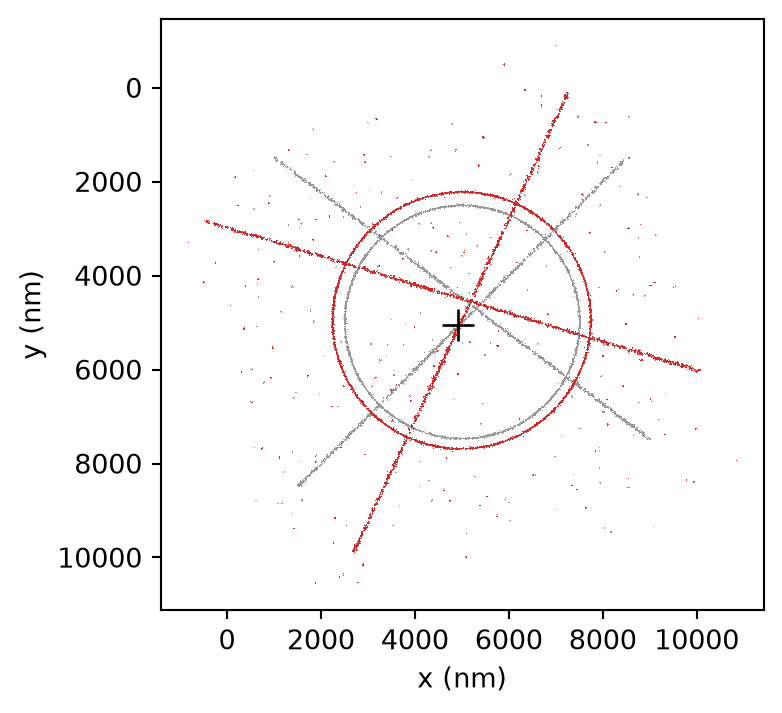
1. Typed values. Shift x, shift y and shift z move the target; rotate turns it, counterclockwise as the picture shows it (y points down, as on the camera); scale multiplies x and y; mirror turns it over, left-right or up-down. Rotation, scale and mirror keep one point still, the centre chosen under about: the middle of the target (the middle of the box around its localizations), the origin (0, 0), or a typed one. They are applied in one order: mirror, then scale, then rotate, all about the centre, then the shift.
A simulated structure turned by 20 degrees and scaled by 1.1 about its middle (red), over where it was (grey). The middle stays where it was.
2. A named transformation. The session keeps a list of transformations under names. A transformation applied here is added to it with keep as, and is then applied by name. The list belongs to the data, not to the GUI: it is saved with the localization file and comes back when the file is opened, but a workspace (File > Workspace) does not carry it. To use a transformation with other files, write it to a file (write to) and apply that.
3. A move recorded in a loaded file. Every move of a table is written into it, with the transformation itself. A movie fitted as two channels and overlaid by Overlay channels records the map that put its secondary half onto the main one; on auto this source takes the last such overlay, so an image of the same chip follows its localizations without the map being looked for. Any other recorded move can be chosen by name and time.
4. A transformation file. Either a _2ct.h5 written by Calibrate transform (or a dual-colour bead calibration), or a _T.h5 this plugin writes (write to) from any transformation it applies. A _2ct.h5 maps the second channel onto the first in camera pixels; it is converted to nanometres with the pixel size of the file being moved. invert applies a transformation backwards, the first channel onto the second.
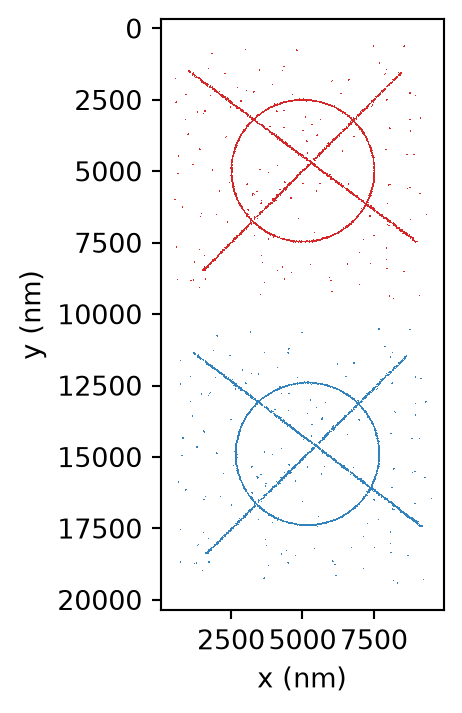
The two channels of a simulated two-camera pair: the second camera's view (blue) is turned and shifted against the first (grey); the _2ct map brings it onto the first (red, drawn over the grey).
5. The drift of another file. Two cameras that record at the same time see the same drift. When one file has been drift-corrected – by COMET or RCC – and saved, its drift curve, kept in the file, is subtracted from the target frame by frame: each localization is moved by the drift of its own frame. The two files must cover the same frames; one of other frames is refused.
6. Images. An image is resampled: each pixel of the new image is taken back through the transformation to where it came from, and the original is read there, interpolated between its four nearest pixels. Every kind of transformation can do that, a projective or polynomial bead map too. The new image lies on the original's pixel grid, so it lies under the localizations as the original does. It joins the session's images as <name>_T, and every image layer that showed the original shows it instead, at the same plane – what that layer was for; a layer showing any other image is left alone. The original stays among the images, for a layer to show again.
With what moves on secondary channel onto main (the default for a map, a recorded move or a file), the image is read as a split chip: only the pixels in the secondary channel's rectangle are moved, and the main channel's are cut out into an image of their own, unmoved, <name>_main – the two channels as two images, one dye each, as the localizations are; show the main one in a second layer to see both. The rectangles come with the map (a _2ct.h5 keeps where the channels lay on the chip when it was measured), or else from what the loaded two-channel fit recorded. An image of the secondary half alone gives the moved image only. Typed values move the whole image.
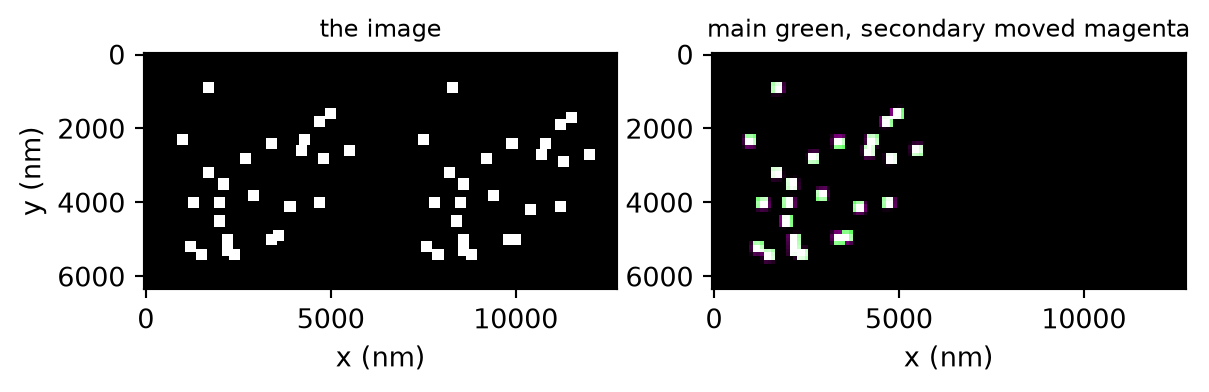
A split chip: squares in the main half (left) and their partners in the secondary half (right), turned and shifted as a bead map says. The moved secondary half (magenta) lands on the main squares (green), which turn white where they meet.
The Preview draws the target before (pale) and after (strong) over the rest of the table, or the new image – the main channel green and the moved one magenta – under the localizations, without adding anything.
Which table. The localizations, whatever the layer shows: every localization of the chosen file (or all files) and channel (or all) moves, whatever the layers' filters show, and merged blinks are merged again from the moved table.
The typed transformation. With  the centre,
 the mirror,
 the scale,
 the rotation by the angle
 and
 the shift,

where the rotation takes  to
 , the rotation of SMAP's TransformLocsManually. z is only shifted. The operations are multiplied into one 4x4 matrix on
 , which is what is kept, written and applied.
A _2ct.h5. Its map  is from the second channel to the first in camera pixels. For a table in nanometres with the camera pixel
 (the file's pixel size, else the table's), the map in nanometres is
 with
 the diagonal of
 . If its last row is
 it is affine, and is kept as one (it can then move an image too); otherwise it is projective. The rectangles of its channels on the chip, when it keeps them, go with it, into the record of every table it moves. A
_2ct.h5 fitted with the third-order polynomial is applied as that polynomial, in camera pixels. Its inverse is the polynomial fitted the other way, not an exact inverse.
What does not change. The precisions and widths (xy_err_nm, sigma_nm) stay as they are, under a scale too: a scale corrects where the localizations are, not how well they were measured. The detection positions (peak_x_nm, peak_y_nm) stay, as a drift correction leaves them: they are the record of what was found where. A table saved in pixels has its x_pix and y_pix moved with x_nm and y_nm.
The drift of another file. The curve comes from the drift COMET or RCC kept in a localization file the session saved after running them, or from the /drift group of a _driftc.hdf5 that smappy-drift writes. The target's frames must lie within the curve's, and its last frame must be within 1% of the curve's frames (at least 10 frames) of the curve's last: the last frames of a movie may hold no localizations in one channel, but anything more is another acquisition.
Images. The new image has the original's corner x0, y0, pixel size and planes. For the centre  of each of its pixels the source point is
 , with
 the transformation (for a polynomial map, the polynomial fitted the other way); the original is read there by bilinear interpolation, every plane of a stack alike. A source point outside the image, or outside the moving channel's rectangle, gives 0. A chip rectangle of
 pixels starting at pixel
 covers
 to
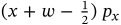 in x, pixel
 centred on
 as a localization's
x_nm is, with  the camera pixel of the table (else of the image).
What is recorded. The table's metadata gets a line in transformations for every move: when, the name, which rows and how many, and the transformation itself (or, for a drift, the file it came from). A table move is one step of the undo; an image move is not – the original is still among the images, and a layer is pointed back at it in the Render tab. The new image's metadata keeps the transformation and which part moved.
| setting | default | what it does |
|---|---|---|
targettarget | localizations | The localizations, or an image layer. |
filefile | file 1 | Whose localizations move. A table of several files (File > Open, Add) moves one file at a time by default: two cameras opened together are two files. |
channelchannel | all | Only the localizations of this channel. For a table with a |
sourcesource | typed | What the target is moved by. Choices: typed; named transformation; recorded in a loaded file; transformation file; drift of another file |
| typed | ||
shift xtyped.shift_x_nm | 0 nm | Added last, after rotate, scale, mirror. |
shift ytyped.shift_y_nm | 0 nm | Added last; y points down in the picture. |
shift ztyped.shift_z_nm | 0 nm | Localizations only: an image has no z. |
rotatetyped.angle_deg | 0 deg | Counterclockwise as the picture shows it. A few degrees at most between two cameras; 90 or 180 for a camera mounted turned. |
scaletyped.scale | 1 | X and y multiplied about the centre. For a wrong pixel size, the right size divided by the one used, about the origin (about: origin) – SMAP's ChangeCamPixelsize. at least 1e-06 |
scale y (more)typed.scale_y | auto | Auto: as scale. at least 1e-06 |
mirrortyped.mirror | none | Turned over about the centre. Choices: none; left-right; up-down; both |
abouttyped.centre | middle of the target | The point rotation, scale and mirror keep. The middle of the target turns it in place; the origin is right for a pixel-size correction, which scales the coordinates themselves. Choices: middle of the target; origin (0, 0); the centre below |
centre xtyped.centre_x_nm | 0 nm | The centre, when typed. |
centre ytyped.centre_y_nm | 0 nm | The centre, when typed. |
namenamed | - | One of the session's named transformations. |
moverecorded | auto: the last overlay of channels | A move the loaded table records, such as a two-channel fit's overlay of its channels. On auto the last overlay of channels; a table with several files lists each file's moves. Choose the transformation file instead when the image's movie was overlaid in another session and the table was not kept. |
from filepath | – | A _T.h5 this plugin wrote, or a _2ct.h5 of Calibrate transform. |
invertinvert | off | Apply the transformation backwards: a _2ct.h5 maps the second channel onto the first. |
drift ofdrift_path | – | A drift-corrected file of the same frames. |
what moves (more)part | secondary channel onto main | Of an image: its secondary channel, cut by the chip regions the map or the fit records, or all. the whole image for an image of one camera, or of a secondary half alone when the map keeps no chip rectangles; the default needs them, from the map or from the loaded fit. Choices: secondary channel onto main; the whole image |
save image (more)image_to | – | The moved image as a TIFF too (SMAP's _T.tif). The TIFF holds the moved image only, with its pixel size; its corner is not kept, so open it beside a table whose image starts at the chip's corner. |
keep askeep_as | – | A name: the transformation joins the session's named ones. A name already in the list is replaced. |
write to (more)write_to | – | A file to write the transformation to. The |
<name>_T, shown by the layers that showed the original, and for a split chip the main channel, <name>_main.Replaces SMAP's (Ries 2020) ApplyTransform, TransformLocsManually, Mirror and ChangeCamPixelsize.
_T.tif; here it is <name>_T among the session's images, shown at once by the layers that showed the original, and a file on request (save image). By default only its secondary channel moves, the main one cut out beside it. The map can also be the move a loaded two-channel fit records.