File › Load · version 1
Read a file smappy wrote.
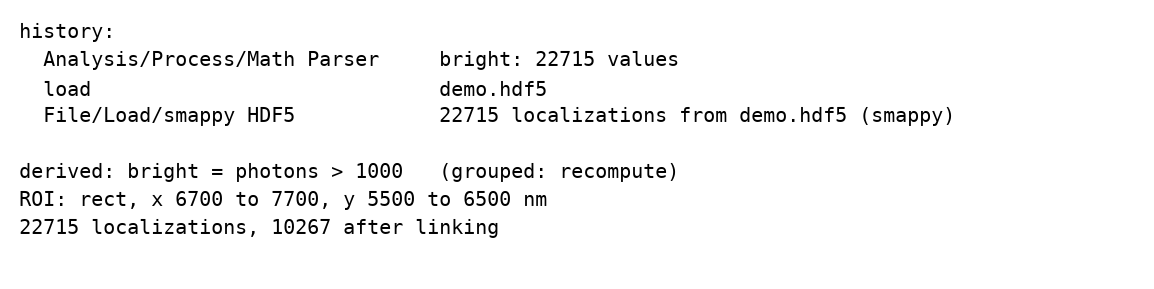
Opens an HDF5 file written by this program: a table saved with Save › smappy HDF5, or the result of a fitter. Everything the file carries about the table comes back with it, so that the analysis goes on where it was left: the history, the derived columns' recipes, the bounds kept with the table, the ROI.
Only this program's HDF5 files are read: one from another program – Picasso's, for instance – does not open.
1. The columns are read from /locs, one dataset each, with the types they were saved with.
2. The metadata is read back from the file's attribute, and with it:
3. Linking. The grouped table is not in the file; it is made again by linking (see Auto).
A simulated table, one Math Parser run and a drawn ROI, saved and opened again with this plugin: what the new session starts from.
Units. A table is read in the units it was saved in. A fitter can write its table in camera pixels (x_pix, ...) instead of nanometres, and it is then opened in pixels. The camera's pixel size, if the file records it, goes into the session's list of files.
Memory. The whole table is read into memory:  bytes for
  localizations,
  the bytes per value of column
  (4 for most, 8 for
 frame) – about as much as the file before compression. The grouped table, one row per blink, comes on top.
The history is read tolerantly: an entry that is not what this version of the program writes is dropped rather than stopping the file from opening, and at most the last 500 are kept.
Tool results come back. What a tool kept with the file – a drift curve, say (/results/saved) – is read with it, however the file is opened, so its Plot works again, and the next save writes it back.
What is not restored. The GUI state that may be in the file (/gui) is left alone: opening a colleague's file does not rearrange your tabs. File > Restore GUI state from file puts it back on request.
The table, added to the session as a file of its own. The text says how many localizations were read and, if they were linked, how many blinks they make. The load goes into the history, after the entries the file brought with it.
| setting | default | what it does |
|---|---|---|
filepath | – | The localization file to read. |
add to the open filesappend | off | Join the table as one more file instead of replacing everything; this is File > Add file. |