File › Save · version 1
Write the current table, its history and its ROIs.
Writes the localizations to an HDF5 file (.hdf5 or .h5), together with the record of what was done to them, so that the file can be opened again here – by smappy HDF5 or Auto – and still says how it was made. HDF5 is an open format; any language can read the columns (in Python with h5py, in MATLAB with h5read).
It is the only format this program writes localizations in. Saving is also File > Save and File > Save as.
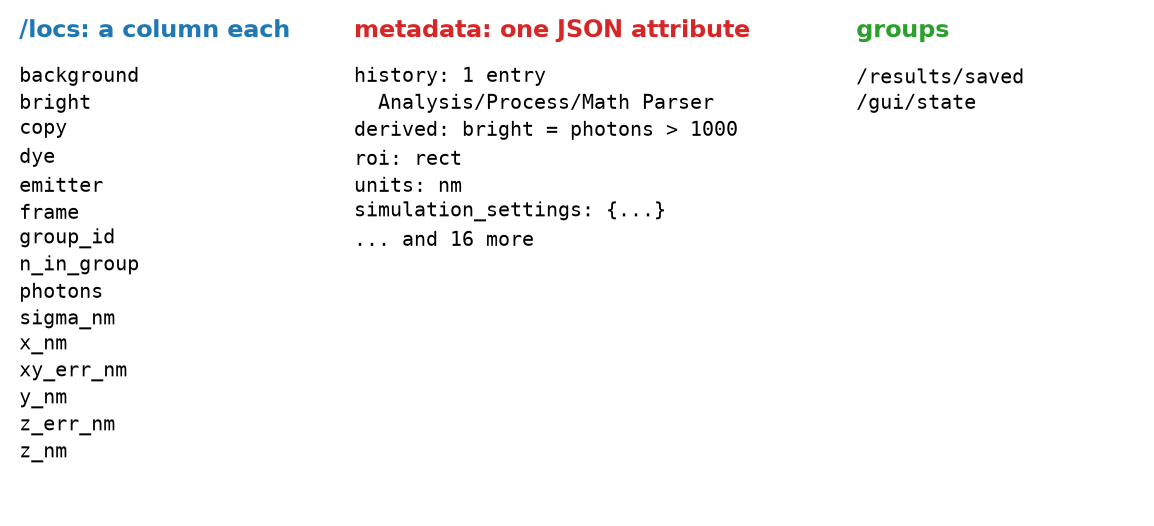
1. The table. Every column of the current table is written as it is, one dataset per column under /locs, with its own type, compressed. It is the ungrouped table: the grouped one is made again by linking when the file is opened. If it has been linked, group_id and n_in_group are among the columns.
2. The record. The table's metadata goes into one attribute of the file, as JSON: the history (every change made to the table, with its settings), the recipes of derived columns, the bounds a plugin asked to keep with the table, a drift correction's summary, the camera and the fit settings of a table that came from a fit, the simulation's settings for a simulated one, the ROI that is drawn, and the ROI manager's project if it was used. Two parts of a fitted table's metadata are too large for an attribute and go beside it: the image tags (what the microscope recorded per frame, such as the piezo position) into /frame_tags, and the acquisition's Micro-Manager summary and device properties into /acquisition. Both are read back into the metadata when the file is opened.
3. What the tools kept. Some plugins keep what they worked out – a drift curve, say – so that its figure can be drawn again later. That goes into /results/saved.
4. The GUI, optionally. With save the GUI state too, the tabs, their plugins and their settings are written into /gui/state, without the window's size and position. They are not put back when the file is opened; File > Restore GUI state from file does that.
What a saved file holds: a simulated table after one Math Parser run, with an ROI drawn.
The history is capped at the last 500 entries, since all of the metadata is one attribute. An entry is a few hundred bytes.
Writing over a file. The file is written from scratch: whatever was in it before is gone, including tool results and a GUI state the session no longer has.
What is not saved. The layers – their filters, their grouping, their colours – belong to the session, not to the file; only the bounds a plugin asked to keep with the table (Remove Localizations' hide flag, for instance) come back. The grouped table is not saved either.
How big the file is. Before compression, a table of  localizations takes
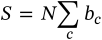
bytes,  the bytes per value of column
  : 4 for most columns, 8 for
 frame. A fitted 3D table with a dozen or so columns is some 60 bytes per localization, 600 MB for ten million; the compression takes part of that off.
Compression is lzf, which is about five times faster than gzip for about 15 % more space. The writer is the one the fitters use to write their results block by block while they run.
| setting | default | what it does |
|---|---|---|
filepath | – | An .hdf5 or .h5 file; empty saves over the open file. Empty works only when the open file is itself |
save the GUI state toogui_state | on | The tabs, their plugins and their parameters, for File > Restore GUI state from file to put back. Useful for a file that is a record of how it was analysed; it costs little space. Nothing is restored unless someone asks for it, so it does no harm in a file that is shared. |
The file. The text says how many localizations went where. The save is written into the session's history, so that the log says where the table went.
SMAP saves _sml.mat files, which this program reads but does not write. The localizations here go to HDF5 instead, which is not tied to MATLAB and can be read while it is being written.