Analysis › Process · version 1 · has a preview
Remove, or hide, the localizations inside or outside the ROI.
Some localizations are not wanted: a fluorescent dirt particle, a bead, a cell that was out of focus, or simply everything except the one cell out of a field of twenty that is to be analysed. This plugin takes a region and either throws away what is inside it or what is outside it.
It can do that in two ways (action):
use by default: 1 kept, 0 hidden) and the filter is set on that column, so they disappear from the picture and from what the other plugins get, but are still in the file and come back when the filter is opened again.Hiding is the safer of the two. A removal can be undone only as long as the session lasts; once the table is saved, the removed localizations are gone from the file. A hidden localization is one slider away, now or next week.
It needs a table and, for the usual use, an ROI drawn in the render window.
1. Which localizations are in the region. With region set to the drawn ROI, a localization is inside when it lies within the shape drawn in the render window, in the picture's own coordinates – its position (x_nm, y_nm, or the pixel columns of a pixel table) on the ordinary picture, and whatever the axes show when the picture is of other columns (photons against frame, say): a rectangle, a polygon, or a line with a width (a line is a rectangle of that width around the segment). The ROI is taken on its own: the layer's filter does not narrow it, so every localization of the table in the drawn shape counts, whichever file or layer it belongs to.
With region set to the selection, "inside" means everything that decides what the current layer shows: its filter, the ROI if one is drawn, and the 3D slab while the 3D window is set to have plugins use it. This is the way to say "keep exactly what I see" (remove the localizations outside the selection), or to remove the localizations a filter already hides.
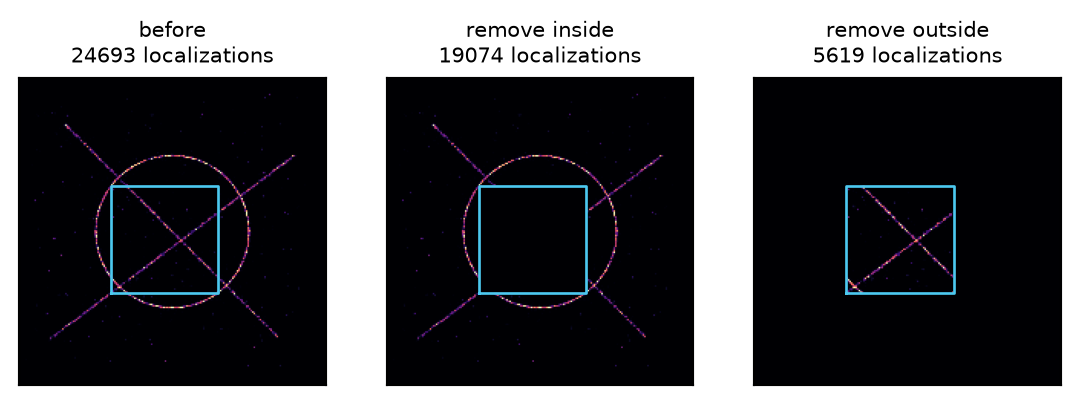
2. Which side goes. The setting remove chooses: the localizations inside empties the region, the localizations outside keeps it and nothing else.
A simulated field of view with an ROI drawn over it (blue). Removing the localizations inside the ROI cuts a hole; removing those outside keeps the ROI alone.
3a. Remove. A new table is made with only the localizations that stay, and it replaces the old one. The old one goes on the undo stack, under the plugin's name, so File > Undo brings it back.
3b. Hide. The flag column is written: 1 for a localization that stays, 0 for one that is hidden. If the column is already there, the two are combined – a localization already hidden stays hidden – so hiding one dirt particle and then another hides both. Then the filter of every localization layer is set to keep use  0.5. No row is deleted, and moving that bound back (or removing it) shows everything again.
Before anything is written the plugin counts what would go, and refuses a run that would take nothing (nothing is on that side of the region) or everything (it would leave an empty table). Preview says the same count without changing the table.
Inside a shape. A rectangle is a test of  and
and  against its edges, the edges included. A polygon, and a line (stored as the four corners of its rectangle), is tested with the even-odd rule: a point is inside when a ray from it crosses the outline an odd number of times. Only the points in the polygon's bounding box are tested, so a small ROI on a large table is quick.
The whole table. Both actions work on the whole ungrouped table, not on the selection of one layer: a localization inside the drawn ROI goes (or is hidden) whatever layer or file it is in. To act on one file only, set region to the selection with the layer showing that file.
A hidden flag and grouping. Once the localizations are linked into blinks, a blink is kept only if all of its localizations are. The flag is stored with a rule for grouping (a recipe with the rule all and no expression, in the table's metadata["derived"]), so it is not averaged like a measured column: a blink that straddles the edge of the hidden region is hidden as a whole rather than coming back as a blink with half a flag. See Math Parser for how recipes work.
The flag's name. flag must be a word of letters, digits and underscores that does not start with a digit, so that it can be used in a filter and in an expression. group_id and n_in_group are refused, because grouping writes them itself and would overwrite the flag. So is a column the table already has, unless it is a flag itself: hiding writes 0 and 1 over it, and a flag named photons would have replaced the photons.
| setting | default | what it does |
|---|---|---|
removewhich | the localizations inside | Which side of the region goes. the localizations outside together with the selection keeps what is on screen and nothing else. Choices: the localizations inside; the localizations outside |
regionregion | the drawn ROI | The ROI on its own, or everything that decides what is on screen. the drawn ROI needs an ROI in the render window; the plugin refuses to run without one. Choices: the drawn ROI; the selection (filter, ROI, slab) |
actionaction | remove them from the table | Hiding writes a column and sets the filter on it, so the decision is reversible and is saved with the file. Prefer hide while deciding; remove makes a smaller table and file, which is worth it only once the decision is final. Choices: remove them from the table; keep them, flagged and filtered out |
flag (more)field | use | The column hiding writes: 1 visible, 0 hidden. Only used when hiding. Keep the default unless two different kinds of hiding should be kept apart – |
The run is recorded in the file's history, with its settings, and can be undone. The flag column and its grouping rule are saved with the file, so the decision survives a reload. So does the filter on it: the bound is kept with the table, and a reopened file hides the same localizations again.
Based on SMAP's Process/Modify/RemoveLocs (Ries 2020). Here:
active field and regroups the table after every run. Here the column is named by flag, the filter is set on it so the hidden localizations actually disappear, and it carries the rule all for grouping, so nothing is relinked unless a layer is showing the grouped table.