File › Load · version 2
Read any known format, choosing the reader by the file name.
Opens a localization file of any format this program reads, choosing the reader from the file's name and, where the name is not enough, from what is inside. It is what File > Open does. The formats, each with a plugin of its own for when the choice should be made by hand:
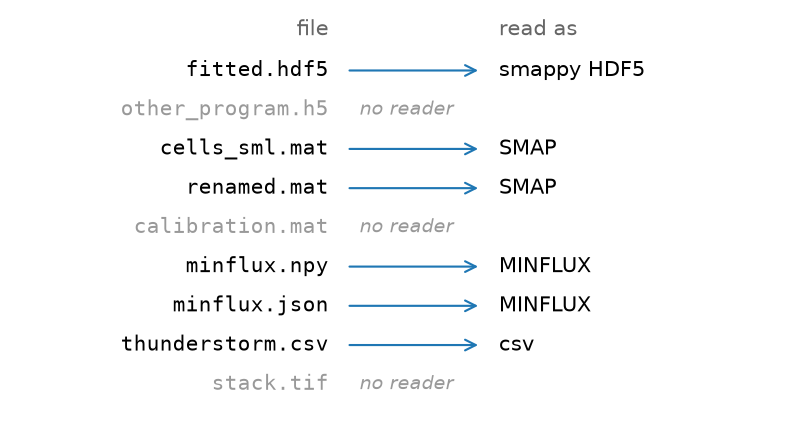
.hdf5, .h5, written by this program;_sml.mat, and any .mat that holds SMAP's saveloc;.npy, .zip, .json;.csv, .txt, .tsv, with the columns guessed from the header.After reading, the blinks are linked, the same whichever reader was used.
1. By the name. The readers whose endings match the file's name are the candidates, in the order of the list above. Upper and lower case do not matter.
2. By the contents, where one ending could be more than one thing:
.hdf5 or .h5 file is read as this program's only if it has a /locs group;.mat file is read as SMAP's if its name ends in _sml.mat or it holds a variable saveloc.The first candidate that passes is used. A file that none will take is refused with the list of formats that are known.
3. Linking. The localizations of the same blink in consecutive frames are linked into one, with the session's linking settings (within 50 nm and a gap of 1 frame by default; the parameters dialog of the Render tab). The linked table is what a layer shows when it is grouped, which is how it opens. An added file is not linked here: it is linked together with the files already open. A table with a trace id (tid, as a MINFLUX export has) is grouped by trace instead, one row per trace. To look at every localization, untick grouped on the layer: the ungrouped table is always kept.
Which reader Auto chose for a set of files: by the ending, and by what is inside where the ending is ambiguous. Grey: refused.
The choice is made before reading, so a file that is chosen and then turns out not to be what its name says fails with the reader's own error. Every .npy, .zip and .json file is taken for a MINFLUX export, and every .csv, .txt or .tsv for a table of localizations.
A csv whose headers are not recognised needs its columns named; the csv plugin has the setting for it, and File > Open asks in a dialog.
What opening costs. Every reader holds the whole table in memory:  bytes for
  localizations,
  the bytes per value of column
  – 4 for most columns, 8 for
 frame – so some 60 bytes per localization for a fitted 3D table, plus the grouped table. Linking a table of tens of millions of localizations takes minutes. Here it is done while the file is read, off the window's thread, so the window stays usable and says what it is doing.
The table, added to the session as a file of its own, or joined to the open ones with add to the open files (a filenumber column tells them apart). The text says how many localizations were read, in which format, and how many there are after linking. The load is written into the history with its settings.
| setting | default | what it does |
|---|---|---|
filepath | – | The localization file to read. |
add to the open filesappend | off | Join the table as one more file instead of replacing everything; this is File > Add file. |