File › Export · version 1
A movie along the frames, or a stack of z slices: the view rendered
Makes a movie of the localizations over the acquisition, or a stack of slices through z: the picture of the render window, drawn again and again while one coordinate moves in steps. Each frame of the stack is exactly what Export Image saves with the layers' filters set to that step's frames (or z range): the visible layers, the panels as the window lays them out, and the scale bar, colour bars and labels over them.
Use it to show how a structure builds up during an acquisition, how something moves in a live-cell experiment, how localizations are spread over time (drift, bleaching, a cell that changed during the measurement), or to go through a 3D structure slice by slice.
z_nm).It writes a TIFF stack (lossless: every pixel as rendered, with the pixel size and the time or z step, which Fiji reads), an MP4 (H.264: plays in slides and browsers, much smaller) or a GIF (plays everywhere, few colours). The form says how many frames it will make and about how large the file will be before it runs.
1. The steps. Along frames, the first window starts at the first frame shown, and a window follows every step frames until one reaches the last frame: frames 0 to 999, 1000 to 1999, ... at a step and window of
overlapping the next (SMAP's default was a step of 1000 and a window of 5000). Along z, slices from from upwards until one reaches to.
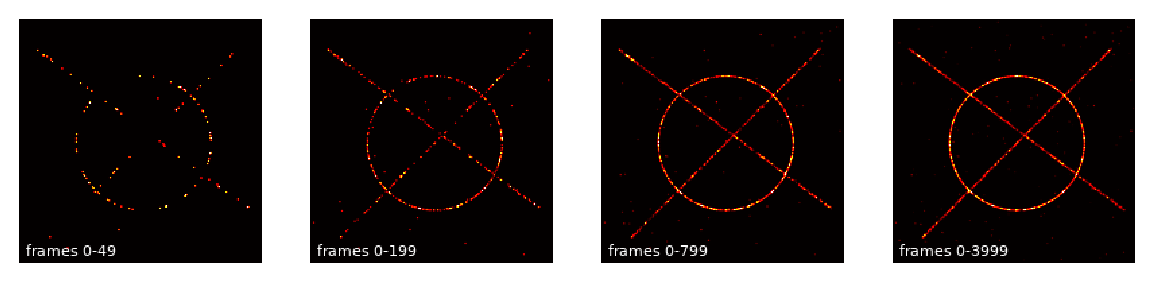
2. Each frame. Every layer is narrowed to the step's localizations – its own filter, and the frame (or z) inside the step – and the picture is drawn as Export Image draws it. Each frame's brightness is set by its own contrast, as in the window, so a cumulative movie is visible from its first frame rather than starting black.
Four frames of a cumulative movie of a simulated structure: the picture fills in as the acquisition goes on. Each is scaled by its own brightness.
3. Through z. The same with z: each slice shows the localizations with z_nm in its range.
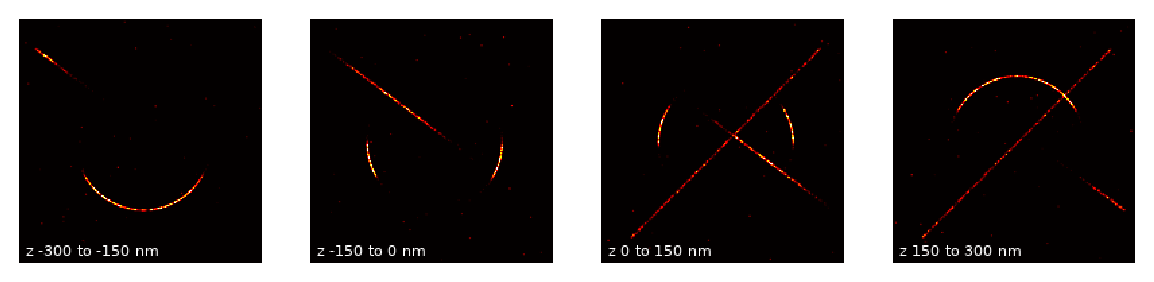
Four slices 150 nm thick through the simulated structure, from below to above: its parts lie at different depths.
4. Tracks. A layer drawn in the tracks render mode joins each track's localizations with lines. In a movie, a window would cut every track to the window's frames; a track tail draws it instead over the frames before "now" (the window's end): each particle is followed by the path it has just taken.
5. The file. The frames are written one by one as they are drawn, so a movie longer than the memory can be made. Stopping the run leaves no file: half a movie is no movie.
The number of frames. Along frames, from the first frame shown  to the last
 , with a step
 and a window
 ,

frame  showing camera frames
 up to (not including)
 , or from
 when cumulative. Along z the same, with
 from from to to, the step and the thickness. The last window or slice may reach beyond the data.
Merged blinks. A layer that shows merged blinks (one localization per blink) places each blink at its first frame.
The camera frames. A fit keeps a few dozen frames, evenly spaced (the fitter's raw frames, 50 by default), not every one. Each movie frame shows the kept frame nearest to its window's last frame – never their average – so the camera side changes less often than the localizations. It is resampled onto the picture's grid and shown in grey from its 1st to its 99.9th percentile. A table without kept frames (one not fitted here, or fitted with raw frames 0) is refused.
Time. With write time / z, a movie frame says the seconds at its window's end when the file's frame time is known, the frames otherwise; a slice says its z range. A TIFF along frames records the time between movie frames (step times the frame time) for Fiji, and a z-stack its step as the slice spacing.
The formats. A TIFF holds every frame as rendered, 3 bytes a pixel, as an ImageJ hyperstack (frames along T, slices along Z), with the pixel size in µm and how it was made in its Info (Fiji: Image > Show Info). An MP4 is H.264 at a constant quality – high, medium and small file are x264's rate factors 18, 23 and 28 – with both sides made even, as the format needs; it is written by the imageio-ffmpeg package, installed with smappy, and the form says so if it is missing. A GIF has 256 colours per frame, which is fine for a picture on black and coarse for smooth colour scales. The sizes the form shows for MP4 and GIF are rates measured on simulated movies; a dense picture makes a larger file.
The cost. Before a run, one frame is drawn and timed, and the time for all of them is reported; a stack that would take more than a minute asks first.
| setting | default | what it does |
|---|---|---|
filepath | – | The stack; its extension (.tif, .mp4, .gif) is its format. |
alongalong | frames: a movie | What moves from one frame of the stack to the next. Choices: frames: a movie; z: slices |
| frames | ||
stepframes.step | 1000 frames | Camera frames from one movie frame to the next. at least 1 frames |
windowframes.window | auto | The camera frames each movie frame shows; auto: the step. Longer than the step for a running average that smooths a sparse movie; equal to it for frames that do not overlap. A window of a few hundred to a few thousand frames is typical: enough localizations per frame to see the structure. at least 1 frames |
cumulativeframes.cumulative | off | Each movie frame shows everything from the first camera frame on. |
track tailframes.tail | auto | A layer in the tracks mode: the frames before now a track is drawn for; auto: the frames the others show. Only layers in the tracks mode use it. A few times a track's typical length shows where each particle came from; much longer and the picture fills with old paths. at least 1 frames |
| z | ||
stepz.step_nm | 50 nm | From one slice to the next. at least 0.1 nm |
thicknessz.thickness_nm | auto | Of each slice; auto: the step. Thicker than the step makes overlapping slices. About the axial precision (50 to 100 nm) is as thin as is useful. at least 0.1 nm |
fromz.z_min_nm | auto | The first slice's lower edge; auto: the lowest z shown. |
toz.z_max_nm | auto | Where the last slice ends; auto: the highest z shown. |
layoutlayout | as the view | The panels as the window shows them, the layers added up, or the camera frames the fit kept on the left of the composite. Choices: as the view; composite only; camera frames beside |
arearegion | the view | What the window shows, the drawn ROI's box, or all the data. Choices: the view; the ROI; everything |
pixelpixelsize_nm | auto | The picture's pixel; auto: as the window displays it. at least 0.01 nm |
frame ratefps | 10 1/s | Frames per second of the movie. 10 to 25 frames per second for a smooth movie; slower to look at each frame. 0.1 to 120 1/s |
qualityquality | medium | MP4: how faithful, against how large. medium is close to what the eye can tell from the TIFF on a picture of localizations; high for a movie that will be zoomed into. Choices: high; medium; small file |
write time / zstamp | on | The frames or seconds, or the z range, on each frame. |
scale barscale_bar | on | A bar of a round length, bottom right. |
colour barscolour_bars | on | The colour scale of each layer coloured by an attribute, top right. |
labelslabels | on | Each panel's name, top left. |
The file, a line in the history, and in the file how it was made: the layers, their settings and the steps. A movie whose frames flicker in brightness has frames with few localizations: a longer window, or cumulative, steadies it.
Ported from SMAP's MovieRunningWindow and BlinkingMoviePresentation (Ries 2020). SMAP's movie took a step and a window and rendered each frame of the ROI; it was saved as a TIFF scaled to the whole movie's maximum. Here: