File › Export · version 2
Render the localizations to a picture file, with no window.
Writes the super-resolved picture to an image file – PNG, TIFF or JPEG – at a pixel size of your choice, independent of the window's size or zoom. It is the picture for a figure, a report or a thumbnail: rendered again from the localizations, so a 5 nm pixel over a whole cell gives a file thousands of pixels wide, however small the window is.
It draws what the layer shows – its filter, the ROI if one is drawn, and the grouped table (one localization per blink) when the layer shows blinks – with that layer's render and colour settings, so the file looks like the window. The picture is framed tightly around those localizations. A filter or ROI that leaves nothing is refused rather than exporting the whole table. (Before version 2 a grouped layer was drawn one localization per frame, and the file came out nearly black: the colours were written as 0 or 1 out of 255.)
It is a picture, not a measurement: 8-bit colour, with the brightness scaled for display. To analyse the localizations elsewhere, save the table instead.
1. The frame. The picture covers the localizations that are shown, from the smallest to the largest x and y, cut into pixels of pixel. The number of pixels follows: a field of 20 µm at 10 nm is 2000 pixels wide.
2. The render. Each localization is drawn as a small Gaussian blob whose width is its precision (xy_err_nm), scaled by the layer's settings, and never narrower than 0.7 of a rendered pixel – or as a plain count per pixel, or a fixed Gaussian, if the layer is set so.
3. The colours. The layer's colour table (LUT), contrast and gamma turn the counts into colours. The contrast sets the brightest pixels to full scale: at the default, the brightest 0.1 %.
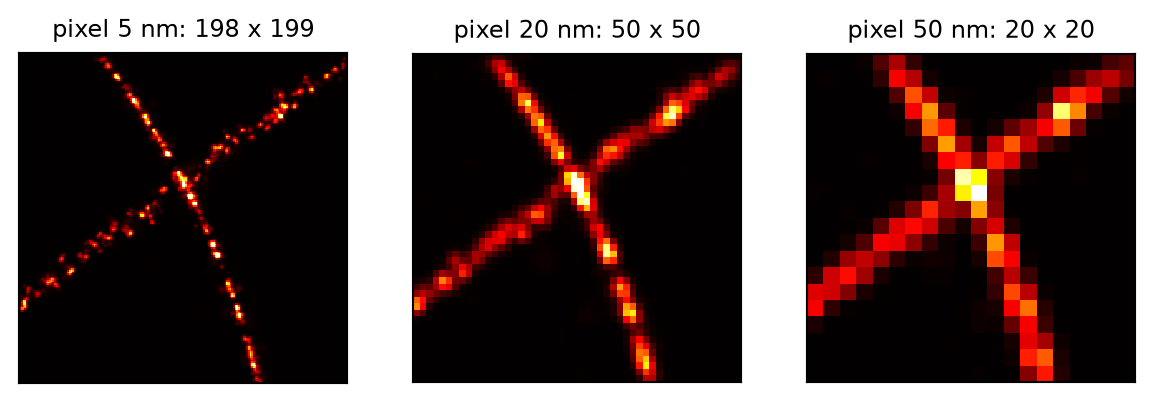
The same ROI of a simulated structure exported at three pixel sizes. A smaller pixel shows more detail and makes a larger file, down to about the localization precision (here about 5 nm); below it, it adds pixels but no detail.
The size. For localizations spanning  to
to  and a pixel
  the picture is
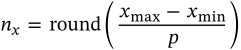
pixels wide, and likewise high; there is no margin, so the outermost localizations sit at the edge.
The blob width. In the default precision mode a localization with precision  is drawn with

 the layer's factor (0.5 for a layer in the window),
  the median of
  over the localizations, so a handful with an absurd precision cannot dominate. The floor of 0.7 pixels keeps a coarse picture from being a field of single bright pixels; it is why the 50 nm picture above is smoother than its pixels alone would make it.
The brightness. The value set to full scale is the  quantile of the pixels,
  the contrast (3 by default): the brightest fraction
  saturates. A picture exported at another pixel size is therefore scaled afresh, and its brightness is not comparable with the first.
The file. Its format follows the extension (.png, .tif, .jpg). PNG and TIFF are lossless; JPEG blurs fine structure and is best avoided for super-resolution pictures. The pixel size is not written into the file, so note it, or draw a scale bar, for a figure.
Without a session – from a script – the table is drawn with the default settings (precision mode with  , the hot LUT).
| setting | default | what it does |
|---|---|---|
filepath | – | The picture; its extension (.png, .tif, .jpg) is its format. |
pixelpixelsize_nm | 10 nm | The rendered pixel, in the table's units. About half the localization precision is as fine as is useful – 5 to 10 nm for a typical dSTORM or PAINT table; coarser for an overview. The picture's size grows as the square of the inverse: halving the pixel makes four times as many. On a picture whose axes are not positions (the Render tab's axes), this is in the units of the x axis. at least 0.01 nm |
The file, and a line in the history saying where it went and with which settings.
SMAP's TifSaver saves the picture as the render window shows it, all layers together, optionally with a scale bar, and writes the pixel size into the TIFF. Here the picture is rendered again at a chosen pixel size, from the first localization layer, without a scale bar.