Analysis › Process · version 1
The per-frame image tags of the acquisition (piezo z, UV pulse, ...)
Micro-Manager writes the state of every device on the microscope into the metadata of every frame. Most of it never changes during an acquisition. The few values that do change are a record of what happened while the camera ran: where the piezo held the focus, how long the UV pulse was, what the focus lock's sensor read, when each frame was taken.
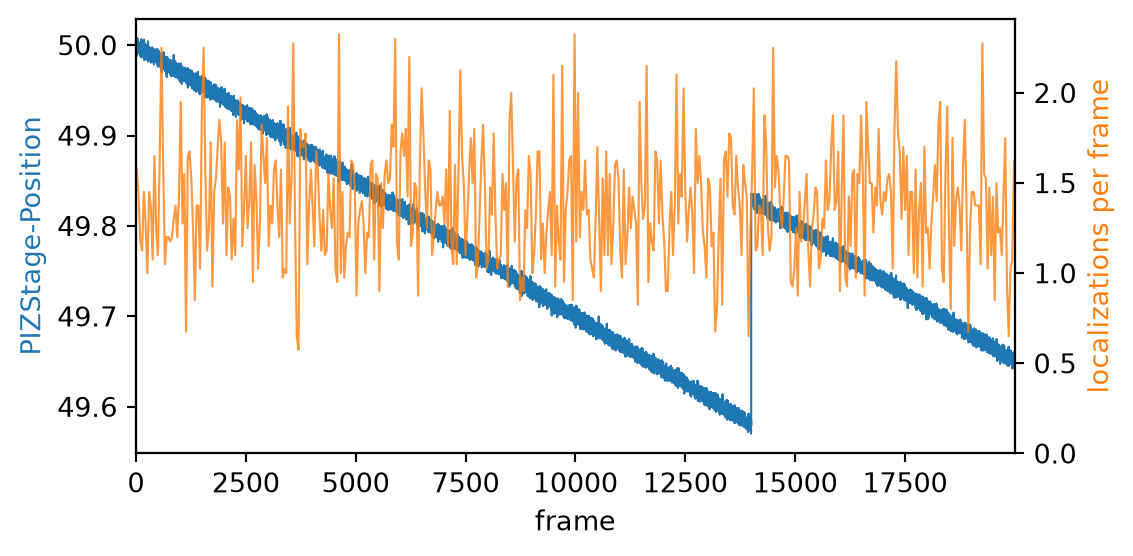
The fit keeps these values with the localizations. This plugin draws each of them against the frame number, one tab per tag, and draws the number of localizations per frame on a second axis beside it. That is how two questions get answered: did the focus lock hold, and did the density follow the UV?
The piezo position is the main thing to check for quality. A focus lock that drifted, jumped or ran into the end of its range shows up there at once, while in the localizations it shows only as a slow loss of quality. So the fit draws the piezo position on its own when it finishes (see show image tags in the fit's output settings), with the same drawing as here.
It needs a table fitted from a Micro-Manager acquisition (an OME-TIFF series, an NDTiff dataset or a folder of single images) by this program. A table loaded from another program has no image tags.
Recording, during the fit. The metadata of a frame is read together with its pixels, so recording it costs no extra pass over the files. Each frame is compared with the first frame. A tag gets a column the first time its value differs, and that column is filled backwards with the first frame's value. You don't have to name anything in advance, and a tag nobody thought of still turns up. Values that change by construction and say nothing the frame number does not (the image number, a UUID, the file name, the time the computer received the frame) are left out. The camera's elapsed time is kept, because a gap in it is a dropped frame.
Numbers and states. A tag whose values read as numbers is kept as a number. A text tag with a few values is a state, such as a laser switched On or Off, and is kept as text. A text tag with many values is an identifier and is dropped.
The acquisition, once. The fit also keeps what the microscope said a single time: Micro-Manager's summary, the device properties of the first frame (without the serial-port settings) and the note in comments.txt, if the acquisition has one. This plugin prints the note above its summary.
Drawing. Each tag is drawn against the frame number. A state is drawn as steps between its values. The localizations in the current selection are counted in at most 500 bins across the frames and drawn as the mean number per frame.
The piezo position as the fit draws it. The focus lock follows a sample that sinks by 0.6 µm over the run, and at frame 14 000 it jumps by 0.25 µm. The localization rate (orange) is drawn beside it, so a jump that cost localizations would show as a step in both.
What is compared. The metadata of a frame is flattened to Device-Property keys first. User data that Micro-Manager wraps as {"type": ..., "scalar": value} is unwrapped and keeps its own name, which is how the camera's hardware clock (Andor-ElapsedTime-ms(HW)) becomes a tag. NDTiff's nested metadata comes out under the same flat keys as a Micro-Manager TIFF's. A frame that lacks a tag the first frame had keeps the value from the frame before it.
The limits. A text tag is dropped once it has had more than 16 distinct values. At most 64 tags are kept, and any tag that starts changing after that is ignored. These limits stop a microscope that writes something new into every frame from making the file grow without bound. Six tags over 93 000 frames take about 4 MB.
Where it is stored. In the localization file, beside the table: the group /frame_tags, one dataset per tag (numbers as 64-bit floats, states as text) and the frame numbers, with the tag names in its names attribute. The acquisition's static metadata goes in the JSON dataset /acquisition. Neither goes into the file's metadata attribute, which is limited to about 64 kB. Both are read back into the table's metadata (the keys frame_tags and acquisition) when the file is opened, and they are saved again with it.
The rate. The frames from the first to the last recorded one are split into bins of  frames, where
  is the number of frames. A bin's value is the number of selected localizations in it divided by
  .
.
| setting | default | what it does |
|---|---|---|
tagstags | – | Names or parts of names, comma-separated; empty: every tag the fit kept. Matching ignores case and looks for the text anywhere in the name, so |
localizations per framerate | on | Draw the rate of the selected localizations on a second axis. The rate is counted over the current selection (the layer's filter and the ROI), so restricting the ROI to one cell gives that cell's rate. |
data["tags"] holds the frame numbers and the values shown.A piezo trace that is flat apart from slow, smooth changes means the focus lock held. Steps, a trace that saturates at a limit, or a burst of noise mark the frames whose z cannot be trusted. Compare their positions with the rate and with the z distribution of the localizations.
Ported from SMAP's Analyze/other/DisplayImageTags (Ries 2020).
imagemetadata setting and nothing else. This program keeps every tag that changes, so no list has to be maintained.