Analysis › Process · version 1
What has been done to these localizations, with the settings used.
Months after an analysis, in front of a figure, the question is always the same: is this the drift-corrected table, and what were the filters set to? The program keeps the answer as it goes. Every run that changes the localizations – a drift correction, a filter that removes localizations, a colour assignment, a fit that makes a new table – is written into a log, together with the line of text the plugin reported and the settings it actually used. The log is saved inside the localization file and read back when the file is opened again, so it follows the table from session to session.
This plugin shows that log, oldest entry first. It changes nothing. With export to set, it also writes the log to a file, for a methods section, a lab notebook or a report about a file that looks wrong.
It is not the undo (File > Undo goes back through the session's own undo steps), and it is not the saved result of a measurement: what a measurement such as Localization Statistics worked out is stored with its figure, not in the log.
What is logged. A run is logged when it hands back a new table or opens files. A run that only measures is not: it can be repeated on the file at any time, so logging it would only record that somebody looked. A few plugins are logged although they change no localization, because what they did is not visible in the table: saving a file and exporting a picture. The session adds its own lines – a file being loaded, removed or regrouped, an undo or a redo – and a chain is logged as one entry with each of its steps under it.
What an entry holds. The time, the plugin's path in the menus (Analysis/Drift/RCC), its report, its settings, and whether it changed the localizations. The changes are marked with a *, and the last line counts them.
Where it lives. The log is part of the session. Saving the table writes it into the file; opening the file reads it back, and the log goes on from there. A file that was saved, reopened and corrected again therefore carries the whole story, not only the last session's.
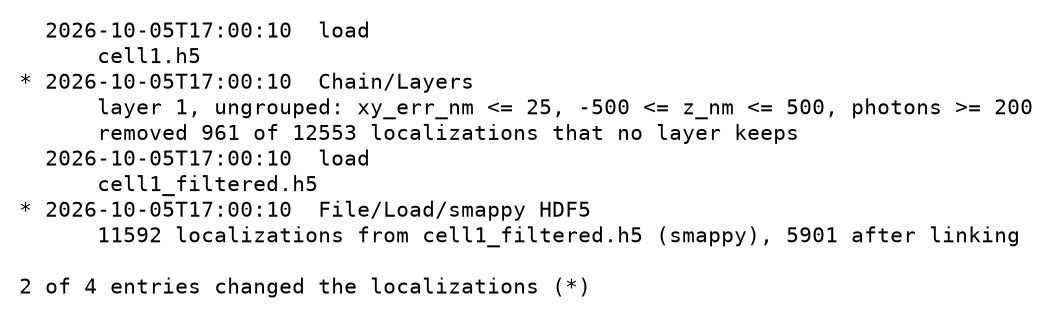
The log of a later session that opened a saved file. The first two entries were written in the session that made the file and came back with it; the measurement run in between is not there, and neither is the save, which was logged only after the file had been written. The two starred entries are what the numbers in this table depend on.
The cap. A file carries at most the last 500 entries: of a log of  entries, the newest
  are written. The whole metadata block is written as a single attribute of the HDF5 file, so the oldest entries are dropped rather than risking a file that cannot be written. The same cap applies when a file is read.
When an entry is written. After the run has finished and its table has been set. A save is therefore logged after the file was written, and the saved file holds the log up to, but not including, its own save; the next save of the same session carries it.
Opening a file. Loading a table replaces the session's log with the file's own, then logs the load as a plain load line with the file's path. File > Open gives only that line. A loader plugin of the File tab (File/Load/...) adds a second, starred one with its report and settings – which reader was used and how the table was linked.
Reading an old file. A log written by another version of the program is read tolerantly: an entry that is not a record of the expected kind is dropped rather than being allowed to stop the file from opening.
The export. The extension of export to chooses the form:
.csv – one row per entry with the columns time, what, changed, text and settings; the settings are one JSON cell, because the settings of a fit and of a drift correction have nothing in common and a column per setting would make a table of mostly empty cells;.yaml or .json – the entries as they are, the settings kept as nested values, for a script;| setting | default | what it does |
|---|---|---|
only what changed the localizationschanges_only | off | Keep only the entries marked *, the runs the numbers in this table depend on; leave out saves, exports and the plain load lines. Useful for a methods section: what is left is exactly the chain of runs that produced these numbers. |
with the settingsshow_settings | on | The parameters each run was given. Nested settings are written as |
export topath | – | Optional: also write the log to a file, in the form the extension asks for. The export always has every setting, whatever with the settings says, and leaves out what only what changed the localizations leaves out. |
* before the ones that changed the localizations, the report indented under the plugin's path, the settings in brackets, and for a chain one line per step. The last line says how many of the entries changed the table.data["history"].A log that says nothing has been done to this table is normal for a table fitted or loaded in this session from a file that carried no log – a file from another program, for example.
SMAP's counterpart is Analyze/other/ShowHistory. There, a plugin that declares itself part of the history appends its whole parameter structure after every run, whatever the run did; the list is saved in the _sml.mat file, and Show History lists each module with its parameters in a dialog and copies them to the clipboard.