File › Load · version 1
Read a csv, tsv or plain text table, guessing its columns.
Opens a localization table written as text – a .csv, .txt or .tsv file with one localization per row – by another program or by hand. ThunderSTORM's export (Ovesný et al. 2014) and SMAP's own column names are recognised without being told; for anything else, columns says which column is which.
What the file needs: a column for x and a column for y, in nanometres. Everything else is optional. A file with no frame column is read as if every localization were in frame 0.
1. The header. The first line is the header if any of its cells is not a number; otherwise the file has none and its columns are called column 1, column 2, ... The cells are separated by commas, or by semicolons if the first line has more of them.
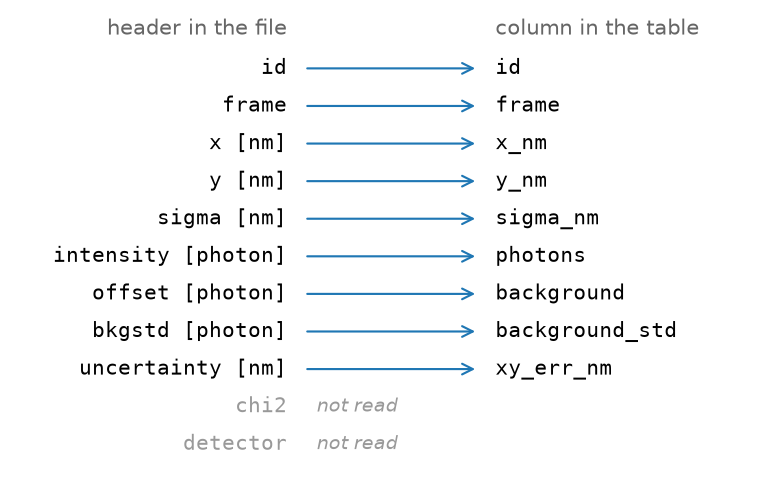
2. Which column is which. Unless columns says otherwise, each header is cleaned – lower case, the unit in square brackets taken off, spaces made underscores – and looked up in a list of the names other programs use. A header that is not in the list is not read. x and y must be found, or the file is refused with its headers listed.
3. The numbers. Every row becomes a localization. frame, channel and id are read as whole numbers, everything else as single-precision numbers, and a row whose x or y is missing or not a number is left out.
A ThunderSTORM export, as this plugin reads it without being told anything: the headers it recognises, units taken off, become columns; the ones it does not are left behind.
The names recognised, after cleaning (CSV_NAMES):
| column | headers |
|---|---|
x_nm, y_nm, z_nm | x, y, z; xnm, ...; x_nm, ... |
frame | frame, t |
photons | intensity, photons, phot, n |
xy_err_nm | uncertainty, uncertainty_xy, locprecnm |
z_err_nm | uncertainty_z, locprecznm |
sigma_nm, sigma_y_nm | sigma, sigma1, psfxnm; sigma2 |
background | offset, bg, background |
background_std | bkgstd |
channel, logl_rel, id | channel; llrel; id |
When two headers mean the same column the first one wins.
Units are not converted. The unit in a header is taken off and not looked at, so x [px] is read as if it were in nanometres. A table in camera pixels has to be converted first,

with  the pixel size in nanometres – in the program that wrote it, or in a spreadsheet. (The reader can do it when it is called from a script, with
 units="px" and pixelsize_nm.)
Frames are read as written. ThunderSTORM counts frames from 1, and its frames keep those numbers here; nothing is shifted. Only the linking of blinks looks at the frame, and for it an offset of one does not matter.
Separators. Commas and semicolons are recognised. A tab-separated file is not split into columns, so it is refused as having no x and y; save it with commas.
| setting | default | what it does |
|---|---|---|
filepath | – | The localization file to read. |
add to the open filesappend | off | Join the table as one more file instead of replacing everything; this is File > Add file. |
columns (more)mapping | – | header=column pairs, e.g. X=x_nm, Y=y_nm, T=frame; empty means guess from the header. Needed only when the headers are not recognised, or to read a column the list does not know. Each pair is header in the file = column in the table, separated by commas, and only the columns named are read – so name x and y too. A file with no header has headers column 1, column 2, ... In the GUI, opening such a file from the File menu asks for the mapping in a dialog instead. |
The table, added to the session as a file of its own. The text says how many localizations were read; the history records the load with its settings, columns among them.