Chain · version 2
The layers' bounds and grouping, as the Render tab would set them.
In the Render tab a person sets up the layers by hand: which layer is grouped, and which localizations each one keeps – a precision better than 20 nm, a relative log-likelihood above -2, at least a few hundred photons. Every plugin downstream reads the localizations through those filters.
A chain has no hands on the Render tab, and a batch job has no Render tab at all. This step does the same work from settings, so that a chain filters every file the same way and says in its log what the filters were. Put it first in a chain (docs/batch.md describes chains and batch jobs).
Without it, a chain filters each file as a freshly opened file is filtered: the default bounds and the default grouping. That is a sensible default, but an implicit one; this step makes it explicit.
One block per layer. Each block says three things:
defaults (the bounds a new layer starts with, then the rows), empty (only the rows), or keep (the layer's current bounds, then the rows);A row for a column the starting bounds already have replaces that bound.
Rows rather than settings. Which columns a table has is not known until a file is open, and in a batch it is a different file each time, so the bounds are rows naming a column rather than one setting per column. In the GUI the column box offers the open table's columns, and from current layers copies what the Render tab shows now.
Per file. When the step runs, each row is resolved against the table in front of it. A quantile row takes its limits as fractions and turns them into values for this file: 0.1 as the lower limit means "drop the dimmest 10%". A row whose column the table does not have is skipped, and the report says so; if it is required, the file is stopped instead, with a message listing the columns it does have.
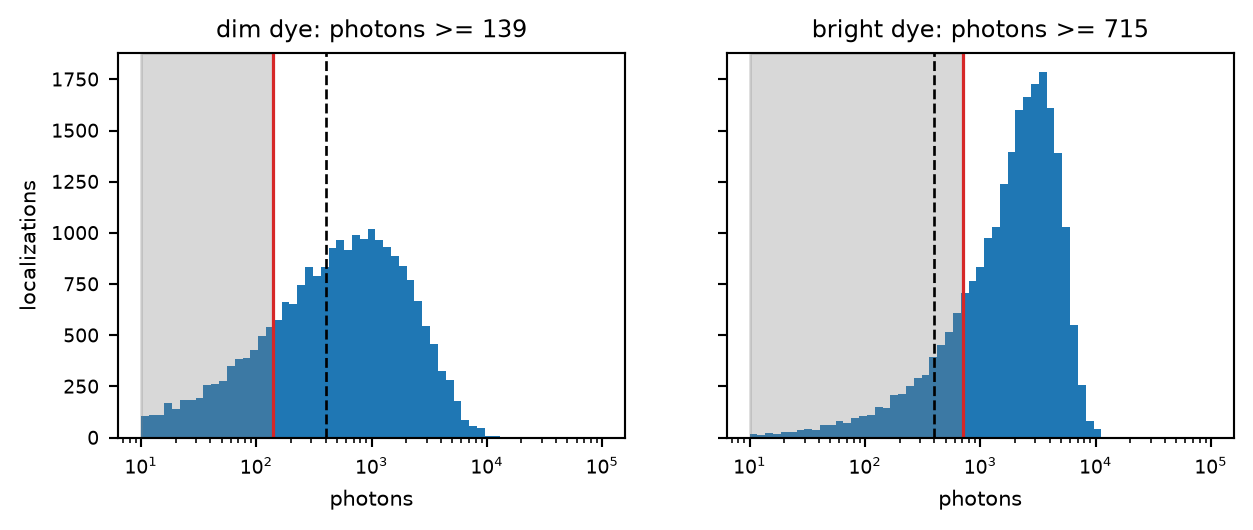
One quantile row, lower limit 0.2, resolved on two files that differ only in how bright the dye is. It removes the dimmest fifth of each (shaded) – 139 photons in one file, over 700 in the other. A fixed limit of 400 photons (dashed) would remove two fifths of the dim file and a tenth of the bright one.
Setting the layers. The resolved bounds replace each layer's filter entirely; a layer's grouping is switched if the block asks for it. A block for a layer the session does not have yet makes one, as a copy of the first. Layers beyond the blocks are left as they are. In the GUI the step acts on the session's own layers, so the Render tab shows afterwards what the chain did.
Removing. With remove filtered, the localizations that no layer keeps are dropped from the table, and so from the file a chain or a batch saves. Without it, nothing is removed: the filters only decide what is drawn and what the next plugins are given.
The defaults. defaults starts from the bounds a freshly opened table gets: xy_err_nm at most 25 nm, logl_rel at least -2, z_nm between -500 and 500 nm, and, for a 2D table (no z_nm), sigma_nm at most 180 nm – each only where the table has the column – and then the bounds the table carries with it, such as the use flag Remove Localizations writes when it hides localizations, so what the file hides stays hidden. (Before version 2 the carried bounds were left out.) A new layer is grouped by default.
Quantiles. A quantile row's limits are fractions  and
and  between 0 and 1. They become the bound

with  the column's value and
  its empirical quantile function over the whole, ungrouped table – not over what another bound or the ROI keeps, and ignoring values that are not finite. An empty limit stays open.
Grouped layers. A layer's bounds apply to its grouped and its ungrouped table alike. A bound on a column that means something else per blink – photons, which is summed over the blink, or n_in_group – is the same number on both, so on a grouped layer it cuts at a different point of the distribution.
What is removed. remove filtered judges every localization of the ungrouped table by the bounds of each layer and keeps those that pass the bounds of at least one. The ROI and a layer's choice of files do not enter into it.
The record. The step's report – one line per layer with its grouping and bounds, the rows that were skipped, and how many localizations were removed – goes into the chain's log entry, together with its settings. Run on its own, it is logged when it removes localizations; otherwise it changes only the layers, and it is the chain's entry that records it.
| setting | default | what it does |
|---|---|---|
layerslayers | {'grouped': True, 'start': 'defaults', 'bounds': []} | One block per layer: its grouping, where its bounds start from, and rows of field, lo, hi (either may be empty); a quantile row takes lo and hi as fractions, resolved per file; a required row stops a file that lacks the field. A lower quantile limit around 0.05 to 0.2 on |
remove filteredremove | off | Drop the localizations no layer keeps from the table, and so from the saved file. Leave it off unless the saved files are meant to contain only what passed: what is removed is not in the saved file, and no later filter brings it back. |
layer 1, grouped: xy_err_nm <= 20, photons >= 139, with the rows that were skipped, and the number of localizations removed.SMAP has no counterpart as a plugin: its layers and filters are set by hand in its render panel. Dropping the filtered localizations was an option of SMAP's writer, only save visible in File/Save/SMLMsaver; here it is remove filtered, a step of its own, so that it is in the log. Quantile bounds, resolved per file, are new.